Project Schedule Maker
Create a project schedule for kickoff, research, design, build, review, launch, and handoff tasks with dependencies and milestones.
Free Gantt Chart Maker
Your Gantt chart is built locally in your browser. Drag task bars to reschedule, resize them to change duration, link tasks into dependencies, drop milestones, and track progress, owners, and priorities. No project management account or calendar connection is required.
One interactive Gantt Chart Maker for project schedules, learning plans, content calendars, renovation plans, product development plans, and small-team task planning.
Add tasks and subtasks, drag the bars on the timeline to set start and end dates, resize to change duration, draw dependency links, add milestones, and track progress, owners, priorities, and budget. Switch between day, week, and month views, manage custom columns, undo and redo, then export PNG, PDF, Excel, or JSON. Everything stays in your browser.
This browser tool is for hands-on project planning: drag task bars to reschedule, resize them to change duration, link dependencies, add milestones, and track progress, owners, and priorities. It is separate from Timeline Maker because the core job is scheduling tasks across time, not only arranging events in order.
Add tasks and subtasks, then drag the bars on the timeline to set start and end dates or resize them to change duration. Track owners, progress, priorities, and budget in the task list, add custom columns, and reorder rows. It fits project schedules, study plans, content calendars, renovation plans, product work, and small-team task planning.
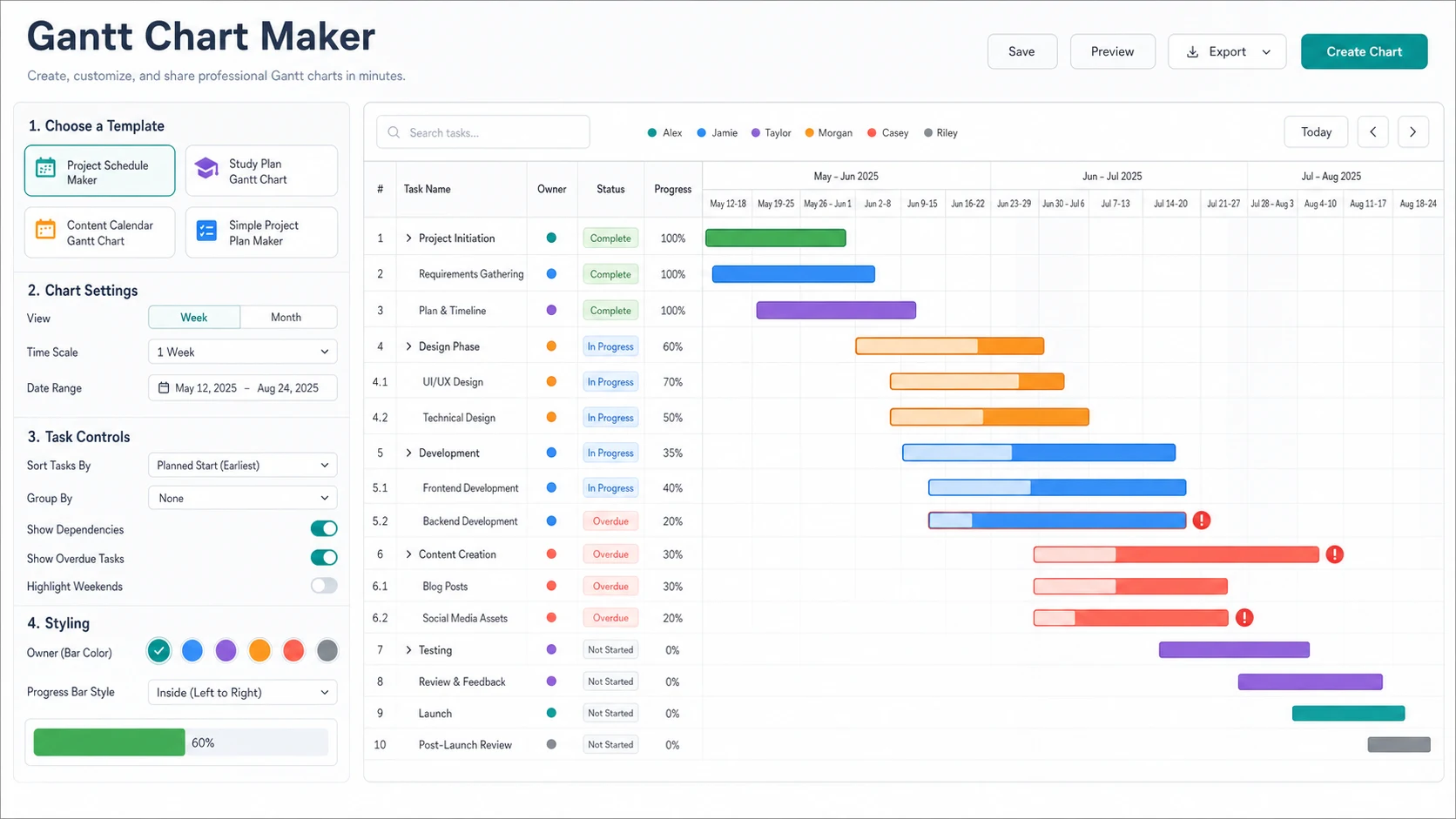
Switch between day, week, and month views, draw dependency links between bars with cycle protection, and drop milestones for key dates. Load project, marketing, or event templates, undo and redo any change, and let autosave keep your schedule in the browser between sessions.
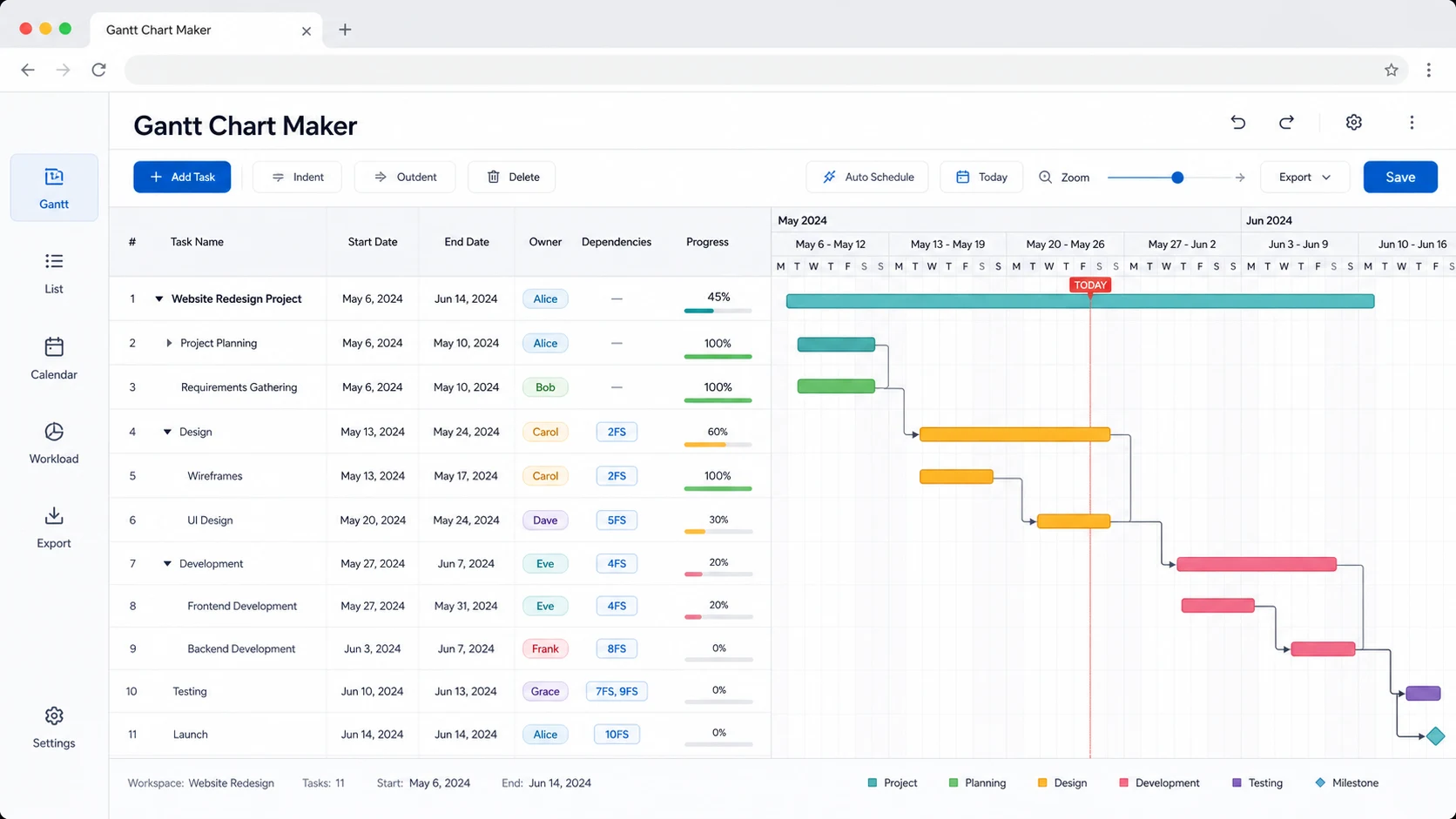
Download PNG for slides, PDF for printable reports, Excel for a colored task and Gantt sheet, or JSON to reopen later. You can also import JSON archives or Excel and CSV tables. This frontend tool intentionally avoids multi-user collaboration, notifications, login, cloud sync, and automatic Google Calendar, Jira, Trello, or Notion sync.
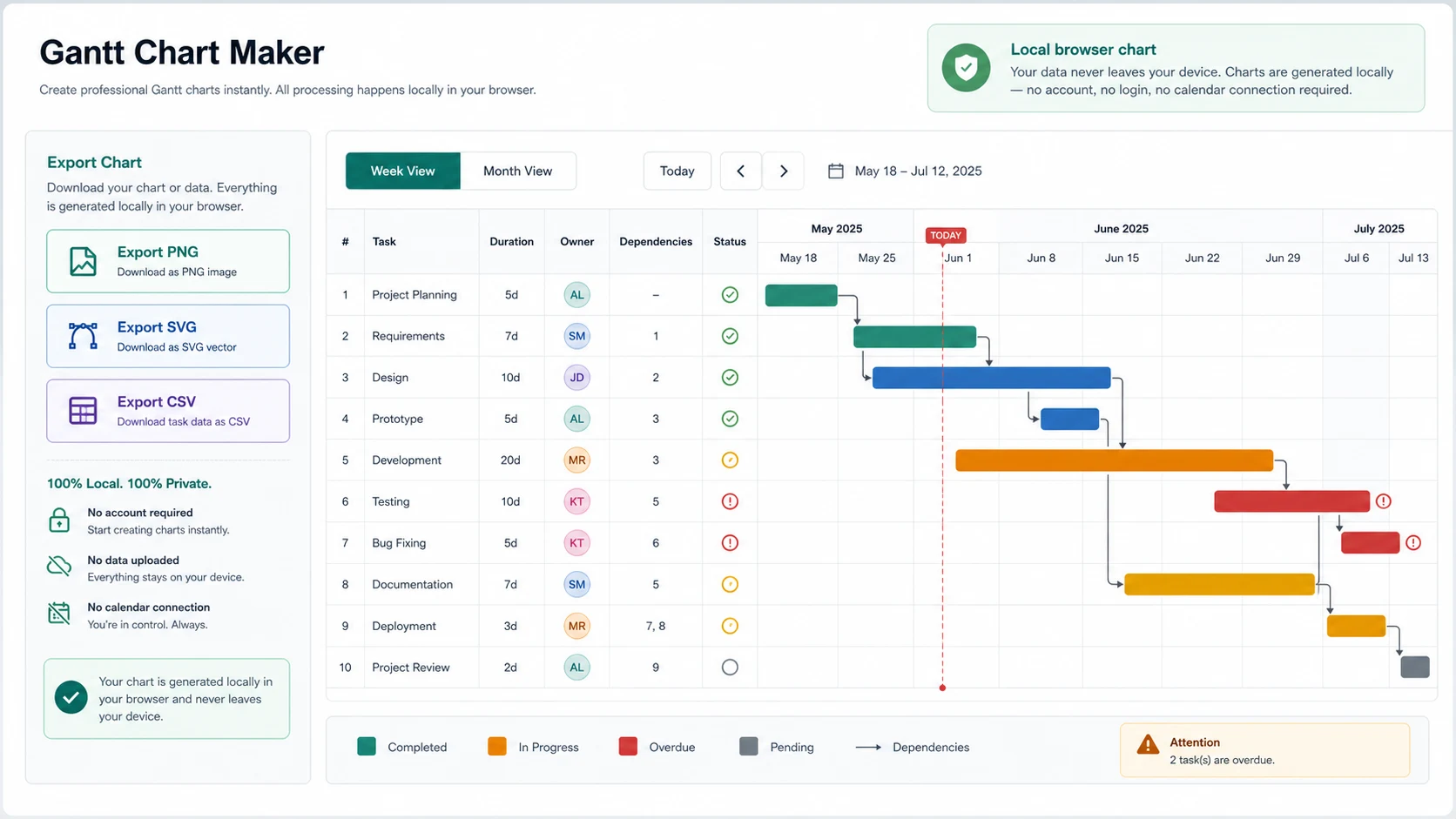
Use one browser-local planning tool for schedules where tasks have duration, progress, owners, priorities, and dependencies. The editor is intentionally a pure frontend interactive schedule maker, not a full project management platform.
Create a project schedule for kickoff, research, design, build, review, launch, and handoff tasks with dependencies and milestones.
Show when tasks start, how long they last, which work depends on previous tasks, and which milestones mark key dates.
Turn reading, practice, review, mock exams, and final revision into a study schedule with progress and dependencies.
Plan topic research, drafting, visuals, editing, approvals, and publishing in a visual content production schedule.
Map measuring, ordering materials, demolition, painting, fixtures, inspection, and cleanup with material lead times.
Use this editor for small-team product work, launch plans, personal projects, and quick client schedules.
The editor is interactive, private, and browser-local. Build task rows, drag the bars to schedule them, link dependencies and milestones, choose a view, then export a schedule without accounts, notifications, cloud sync, or calendar permissions.
Add tasks and subtasks, rename them inline, and set owners, priorities, progress, and budget in the columns. Use the Templates menu for a project, marketing, or event starting point, or import a JSON, Excel, or CSV table.
Drag a bar to move a task, drag its edges to change duration, and drag from a bar to another to create a dependency. Drop milestones for key dates, switch between day, week, and month views, and watch the today line and progress fills update live.
Export PNG for slides, PDF for printable reports, Excel for a colored task and Gantt sheet, or JSON to reopen later. The tool does not provide collaboration, reminders, login, cloud sync, team permissions, or automatic Google Calendar, Jira, Trello, or Notion sync.
Store exported PNG, PDF, Excel, and JSON files only where you are comfortable keeping the underlying task information.
Practical answers about the interactive Gantt Chart Maker, dependencies and milestones, input formats, privacy, exports, mobile fit, and when this is the right planning chart.
Yes. This page combines Project Schedule Maker, Task Timeline Chart, Study Plan Gantt Chart, Content Calendar Gantt Chart, and Simple Project Plan Maker intent because each one needs tasks with duration, progress, dates, owners, priorities, and dependencies.
Yes. Drag a bar to move a task, drag its left or right edge to change the start or end date, and drag from one bar to another to link them as a dependency. Cycle protection prevents impossible loops, and milestones can be added for key dates.
Timeline Maker is best for events, milestones, phases, and stories in chronological order. A Gantt chart is best when each row is a task with a start date, end date, duration, owner, progress, priority, and dependency relationship. The search intent is closer to project planning and scheduling.
You can build tasks directly in the editor, start from a built-in template, import a JSON project archive, or import an Excel or CSV table. The importer maps task, start date, end date, owner, progress, priority, and indent columns, and turns any extra columns into custom fields.
No. Your Gantt chart is built locally in your browser and autosaved there. No project management account, calendar connection, cloud sync, team permission system, notification service, or third-party API connection is required, and export libraries are bundled rather than loaded from a remote server.
You can download PNG, PDF, Excel, or JSON. PNG suits slides, PDF suits printable reports, Excel keeps a task sheet plus a colored Gantt sheet, and JSON lets you reopen the exact project later in this editor.
No. This frontend planner intentionally does not include multi-user collaboration, notifications, account login, cloud synchronization, team permissions, or automatic Google Calendar, Jira, Trello, or Notion sync. Those features require backend services, third-party APIs, stored accounts, or account authorization, so they are outside a pure frontend website.
Yes. The editor is responsive and works on phones, tablets, and desktops. A larger screen is more comfortable for dragging bars, linking dependencies, and editing many tasks, so the timeline is easiest to use on a tablet or desktop.
Yes. You can use exported PNG, PDF, Excel, and JSON files in client reports, lessons, project updates, content planning documents, renovation schedules, and internal team materials.
Use the interactive Gantt Chart Maker to turn tasks, dates, owners, progress, priorities, dependencies, and milestones into a clear project schedule.
The editor stays browser-local, needs no account, and exports PNG, PDF, Excel, or JSON for practical planning documents.
Free Gantt Chart Maker. No login, no project management account, no calendar connection.